
Written by our lead diver at Scuba Space, a PADI Master Scuba Diver and Law Enforcement Public Safety Diver with 12+ years of professional underwater operations experience.
In the underwater world, you’ll need to constantly monitor your depth, time, and amount of air left in your tank. This is where your dive computer comes in.
So, what is a dive computer? It’s the single most important piece of personal gear you’ll ever own. It’s the modern replacement for outdated dive tables and gives you real-time information to keep you safe. If a scuba mask is your window to the underwater world, your dive computer is the brain behind the whole operation.
This guide will go into dive computer basics so you can choose the perfect one for your adventures.
Let’s get into it.
Interested in diving? Learn about scuba certifications here:
*Scuba Space is a participant of affiliate programs and earns from qualified purchases*
What is a Dive Computer?
A dive computer uses a pressure sensor to measure your depth and an internal clock to measure your dive time. It feeds this data continuously to a mathematical model called a decompression algorithm.
This algorithm calculates how much inert gas your body is absorbing/releasing in real time. It gives you a constantly updated picture of your No Decompression Limit (NDL) and lets you when you need to make a decompression or safety stop.
This is a monumental step up from the old-school dive tables. With a dive computer, you don’t have to follow a pre-planned dive profile. The computer dynamically adjusts its calculations so you can be more flexible and spend more time underwater safely.
Note: This is not an excuse to forget your how to use dive tables. It’s still important to know how to use them as a backup.
Dive Terminology for Computers
Let’s get into the deets of what some of the key parts and functions are called.
Algorithm: This is the mathematical model that your computer uses to calculate nitrogen absorption/release. Different brands use slightly different algorithms. These can be more or less conservative. A more conservative algorithm gives you a shorter no-decompression limit. Safer, but less fun time underwater.
Display: This is the screen that shows you all your critical information. Things like depth, time, and NDL all go here. They come in all kinds of styles from basic LCD to full-on OLED screens. A good display is easy to read in all conditions.
Interface: This is the way you interact with your computer. Everything from the buttons or touchscreen used to navigate the menu. An intuitive interface means less fiddling around and more focus on your dive.
Nitrox Compatibility: This feature lets you to set the computer for different oxygen percentages in your tank. If you’re using Nitrox, your computer will adjust its decompression calculations accordingly.
Battery: Dive computers are powered in one of two ways. Some have a user-replaceable battery. Others have a rechargeable battery, which can be charged with a USB cable like a smartphone.
Types of Dive Computers
Time for the fun part. We’re going into the different styles of dive computers out there. These are primarily defined by how they’re worn.
Wrist-Mount Computers
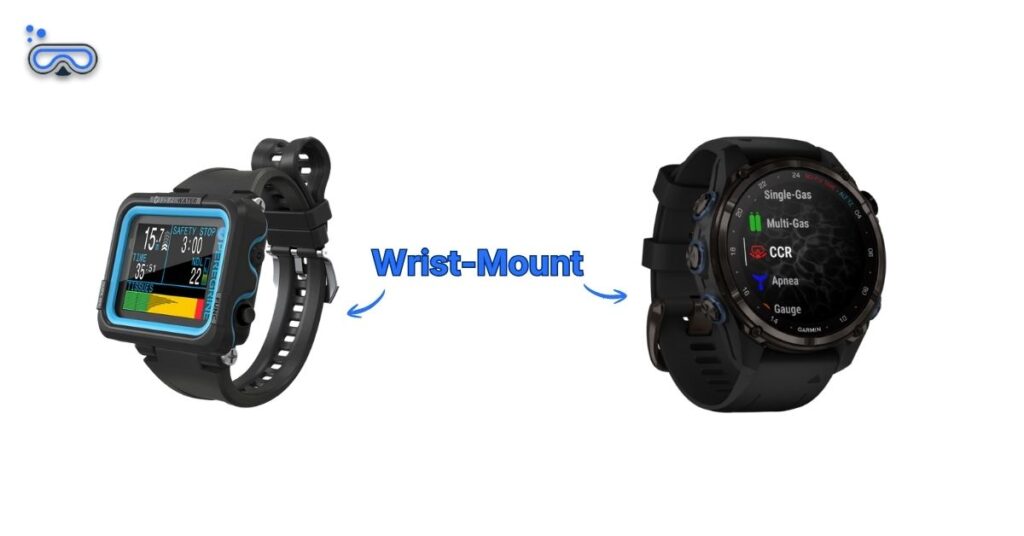
These are the smartwatches of the diving world. They’re designed to be worn on your wrist, and many are stylish enough to be used as an everyday watch. This makes them incredibly convenient, as you can wear it from the moment you leave your hotel to the moment you get back, with no fear of forgetting it.
Some models are huge and bulky. They include every feature you can possibly think of, perfect for the modern diver who wants all their essential information literally at their fingertips. You won’t be able to wear these as everyday watches, though.
Pros:
- Versatile: The compact models can be used as an everyday watch. The larger models give you information-rich displays.
- Convenient: Always on your wrist and easy to access.
- Streamlined: No Need for a separate console and hose. This cuts down on drag and clutter.
Cons:
- Display Size: The compact models can be hard to read.
- Bulkiness: The feature-heavy models are very large and heavy.
Like the watch-style look? Check these out here:
Console-Mount Computers
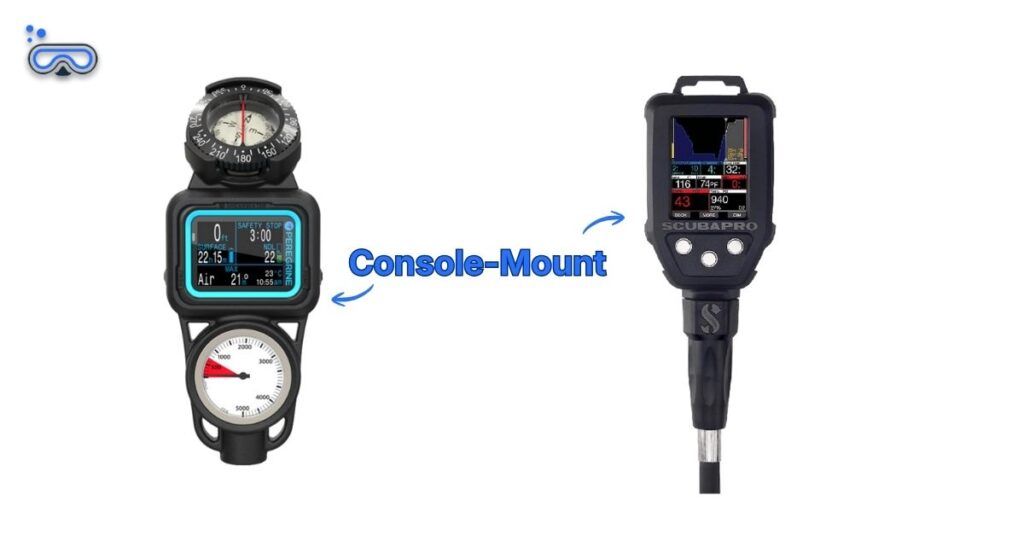
These are the tried-and-true workhorses of the dive world.
The computer is housed in a rubber console that’s usually attached to your first stage regulator by a high-pressure hose. The console setup normally includes a submersible pressure gauge (SPG) for your tank pressure and sometimes a compass.
This all-in-one design keeps your gauges neatly organized. These computers tend to have larger displays. This makes them an excellent choice for divers who prefer a bigger view of their data.
Pros:
- All-in-One: Keeps gauges neatly organized and accessible.
- Reliable: The hosed connection is a proven system.
- Large Screen: Often have a bigger, easier-to-read display.
Cons:
- Bulkiness: The console and hose add to the overall size and weight of your gear.
- More Drag: The hose can be cumbersome and create drag in the water.
- Not Wearable: You can’t wear it around when you’re not diving.
See our top picks for consoles here:
Other Mounting Options
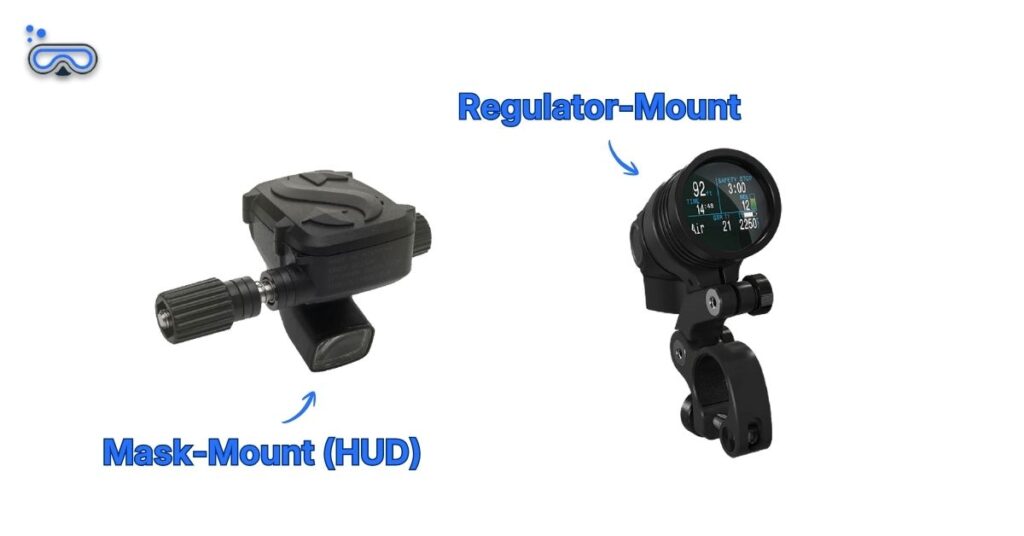
While most divers go for a computer on their wrist or in a console, the world of dive gear is full of innovative solutions.
These advanced computers are designed for divers who need a truly hands-free experience. Unlike traditional mounts, these computers are placed directly in your line of sight.
This category includes models that project a virtual display in front of your mask or a tiny screen mounted on regulator. They’re best for underwater photographers, videographers, and tech divers that need to keep their hands free.
Pros:
- Hands-Free Operation: Perfect for tasks that need full use of both hands.
- Constant Visibility: Your key dive data is always in view.
- Ergonomics: Prevents the neck strain from constantly looking down at a wrist or console.
Cons:
- High Cost: These are specialized pieces of equipment with a price tag to match.
- Learning Curve: The display can feel unnatural and takes time to get used to.
- Specialized Use: They aren’t practical for most recreational divers and are considered a luxury item.
These are probably not needed for recreational diving. However, as a public safety diver, having both hands free can literally be a lifesaver. I’ve grown so used it that I now use a hands-free option for everything, including recreational diving.
Editor’s Note
Key Dive Computer Features
After you’ve decided on the physical type of computer you want, you can start looking at the specific features that will help you most. These are the bells and whistles that can take your diving to the next level.
Air Integration
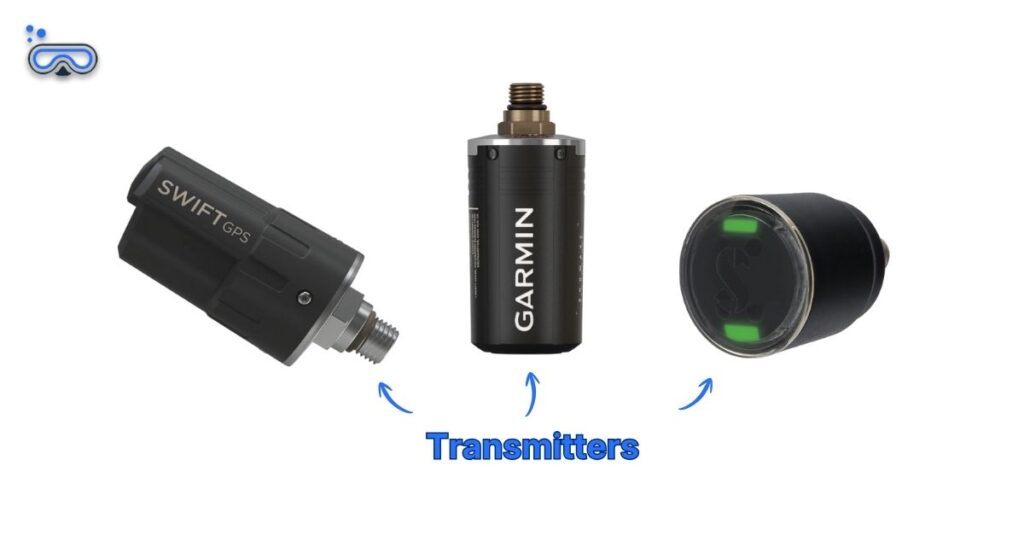
Air integration (AI) lets your computer to read your tank pressure and display it on the screen. This is a game-changer because it gets rid of the need for a separate pressure gauge.
It’s also a huge safety benefit, as your computer can use your air consumption rate to calculate your “Remaining Bottom Time” (RBT) and give you a more accurate picture of how long you can safely stay underwater.
There are two ways a computer can be air-integrated.
Hosed Air Integration: This is the more traditional way for a computer to get tank pressure data. The computer is part of a console, and a high-pressure hose physically connects it to your regulator. This method gives you a hard-wired, foolproof connection with no risk of signal loss.
Wireless Air Integration: This is the most popular modern form of air integration. A small transmitter screws into a port on your regulator and wirelessly sends your tank pressure data to your wrist-mounted computer. Wireless air integration gives you the ultimate streamlined setup with no cumbersome hoses.
This is a super convenient feature and I love my air integrated computer. I highly recommend it if it’s in your budget. However, I still dive with an analog console as backup in case anything malfunctions. I highly recommend you also have an analog backup.
Editor’s Note
Advanced Display Technology
Early dive computers had simple screens, kinda like an old digital watch. Today, most advanced computers have HD displays that look awesome underwater.
The technology used in the screen majorly impacts readability, battery life, and your overall experience.
Here’s a quick look at the displays.
LCD (Liquid Crystal Display): This is the most common screen you’ll find on dive computers. LCDs use liquid crystals and a backlight to create an image. They’re reliable and cost-effective. However, needing a backlight means they’ll use more power and aren’t as vibrant in low-light conditions.
TFT (Thin-Film Transistor): You’ll usually see this term paired with LCD ‘cus TFT is a type of LCD display. TFT displays use a thin film of transistors to control each pixel. This gives you full-color images and much better clarity and contrast.
OLED (Organic Light-Emitting Diode): This is where screens start to get really fancy. Unlike LCDs, OLED pixels are “self-emissive.” This means each pixel gives off its own light. You’ll get way better contrast and true blacks, since a pixel that is black is simply turned off.
AMOLED (Active-Matrix Organic Light-Emitting Diode): This is the upgraded version of OLED. The key difference is the “Active-Matrix” part. This is a layer made of Thin-Film Transistors (TFTs) behind the screen. The layer gives you faster response times and higher refresh rates.
How to Choose a Dive Computer
So, which dive computer is right for you? It really depends on your diving style, your experience level, and your budget.
Beginner Computers
Beginner computers are simple and user-friendly. They have all the essential safety features you need for a rec dive without overwhelming you with complexity.
These computers will show you your current depth, dive time, and NDL. They’ll also let you know if you’re coming up too fast.
These computers are best for new divers, students, and those who want a reliable tool for basic rec diving.
Advanced Computers
These computers are complex and feature-rich.
They can handle multiple gas mixes (like Trimix), connect to rebreathers, and have advanced customization options. They usually include integrated digital compasses and let you download your dive logs to an app on your phone.
They’re best for divers who plan to progress to more complex diving, underwater photographers who need a clear, compact display, or tech divers who require specific functions.
Things to Look For
Here are some things you’ll want to keep in mind:
Readability: Can you read the display easily in bright light, low light, and when it’s wet? A computer with an excellent display is worth its weight in gold.
Ease of Use: Is the interface intuitive? Can you navigate the menus and find the information you need quickly, even with gloves on?
Battery Life: Is a rechargeable battery or a user-replaceable battery better for your diving habits? This is especially important for long dive trips.
Algorithm: Do you want a more or less conservative algorithm? Most computers these days will let you adjust the setting.
Common Questions About Dive Computers for Beginners
Do I really need a dive computer as a beginner?
While you can technically dive using tables and a depth gauge, a dive computer is considered essential safety gear today. It provides real-time tracking of your nitrogen levels, ascent rates, and no-decompression limits, making every dive significantly safer and more flexible than manual calculations.
How long do dive computer batteries last?
It depends on the model. Traditional computers with user-replaceable batteries typically last 1 – 2 years or 50 – 100 dives. Modern rechargeable units usually offer 20 – 40 hours of active dive time per charge. Always check your battery level before a dive trip.
Can I use a regular smartwatch as a dive computer?
No, unless it is a specialized hybrid like the Garmin Descent series or the Apple Watch Ultra (with the Oceanic+ app). Standard smartwatches are not pressure-rated for depth and lack the decompression algorithms necessary to calculate nitrogen loading safely.
Wrapping Up
I personally started with the original Mares Puck (segmented, wrist-mount. Similar to this). That thing served me well for many, many years. A couple of years ago, I finally picked up an upgraded computer and decided to go with the SCUBAPRO Galileo HUD (OLED, mask-mount). This thing has been an awesome addition to my kit and I now use it everywhere.
Editor’s Note
The best dive computer for you isn’t always the most expensive one with the most features. It’s the one that you feel most comfortable using and keeps you safe.
- For Simplicity and Versatility: A wrist-mounted computer is a great choice.
- For New Divers: A console-mounted computer is a solid, reliable option.
- For Convenience and Safety: An air-integrated computer is the way to go.
The best way to know for sure is to try them. See if your local dive shop can help you find a computer matches your diving needs.
You can also check online at shops with great return policies and fit guarantees. This is a super convenient way to do it if you don’t have any local shops in the area.
Don’t be intimidated by all the options out there. You’ll know when you’ve found the right one!
A dive computer is just one part of the puzzle. To learn what else you need in your kit, check out our guide here:
Or if you’re ready to pick up your first, we’ve put together lists of our favorites: